
Previous
Next
Maximize Efficiency with the Omron CJ1W-OC211
1. Introduction
1.1 Overview of the Omron CJ1W-OC211
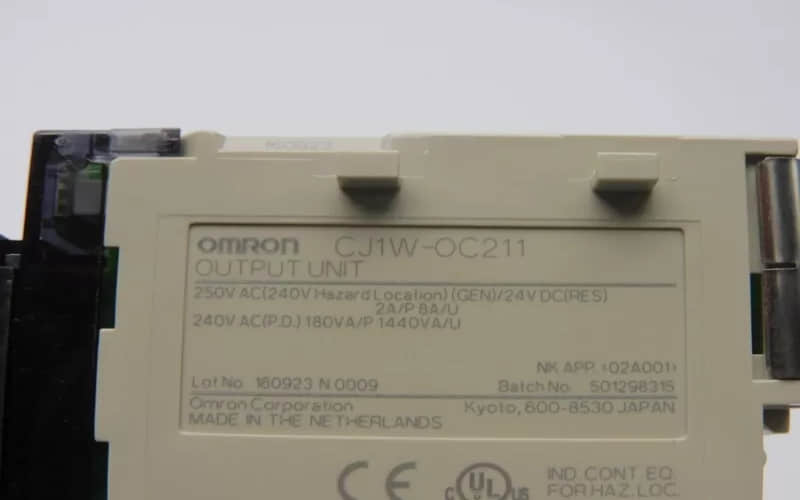
l The Omron CJ1W-OC211 is a 16-point contact output unit designed for use with CJ/NJ controllers. It features a maximum switching capacity of 2A at 250VAC (cosφ = 1) or 2A at 24VDC.
l The unit uses NY-24W-K-IE relays. These relays can last for up to 150,000 operations at 24VDC with a resistive load. It has an ON and OFF response time of 15ms at most. This makes it good for applications that need quick control.
l The design of the CJ1W-OC211 includes a screw terminal block for convenient external connections. It has a maximum internal current consumption of 110 mA at 5 V DC and 96 mA at 24 V DC. The unit weighs no more than 170 grams. This makes it a lightweight and space-saving part for many industrial control systems.
l This output unit is ideal for tasks that require reliable and efficient control of multiple devices using relay contacts. Its high switching capacity and fast response times enable it to manage multiple tasks in automation and control settings.
1.2 Importance of Efficiency in Automation
l In the realm of industrial automation, efficiency is a cornerstone that drives productivity, cost reduction, and overall system performance. The Omron CJ1W-OC211 is a crucial component of automation systems. It shows how design and function can improve efficiency.
l The CJ1W-OC211 has a fast response time of 15ms for both ON and OFF operations. This speed is crucial for maintaining the smooth operation of automation processes. This rapid response ensures that the system executes control signals promptly, minimizing delays and maximizing throughput.
l In environments such as manufacturing lines or robotic systems, precision and timing are crucial. The efficiency of the CJ1W-OC211's relay contacts affects the overall efficiency of the whole system.
l The unit can handle a maximum switching capacity of 2A at 250V AC or 24V DC. This allows it to manage multiple devices simultaneously without overloading. This high capacity means that fewer components control multiple processes, which reduces complexity and potential points of failure. By efficiently managing power distribution and control signals, the CJ1W-OC211 contributes to a streamlined and reliable automation setup.
l The CJ1W-OC211 is lightweight, weighing less than 170 grams. Its small size is important for tight spaces. A smart use of space enables designers to create automation systems with a small footprint. This helps maximize the use of factory floors and reduces installation costs.
2. Key Features2.1Technical Specification
l I/O System CJ I/O Bus
l Expansion Unit Type: Basic I/O Unit
l Type of Module: Digital I/O
l Number of Digital Input
l Number of Digital Outputs 16
l Digital Output Type Relay NO
l Permitted Voltage at Output: 5-250
l Output Current 2 A
l Short-Circuit Protection Yes
l I/O Connection Type Screw
l Number of I/O Connectors 1
l Detachable I/O Connector Yes
l Suitable for Safety Functions: Yes
l Dimensions (H x W x D) 90 mm x 31 mm x 89 mm
l Weight 118 g
2.2 Compatibility
The Omron CJ1W OC211 has been designed to ensure seamless integration with a wide range of Omron CJ series and NJ controllers. Therefore, an essential component exists in expanding and enhancing an automation system. This compatibility is essential for maintaining consistency in industrial control applications.
The unit can connect directly to CJ1W or NJ1 controllers using a standard interface. This feature is important for compatibility. You can easily integrate the CJ1W OC211 into existing systems without needing complicated modifications or additional hardware. Omron has established protocols for communication and power, enabling the unit to work in harmony with other components.
The CJ1W OC211 supports different voltage and current options. It works with 24V DC, 250V AC, and more. This makes it great for many applications and loads. Its versatility enables users to utilize it with a variety of actuators and sensors commonly found in industrial environments.
The unit is lightweight and compact, weighing less than 170 g. This makes it easy to install in systems with limited space. The screw terminal block is a straightforward and reliable method for connecting external devices. This makes it compatible with a variety of applications.
2.3 Unique Selling Points
Omron CJ1W OC211 is a standout product on the market. It features several key advantages that make it a great choice for industrial automation.
High reliability: The NY-24WK-IE relays provide a long electrical life of up to 150,000 operations. This ensures steady performance over the years.
Fast response: It has a maximum reaction time of 15ms, both for ON and OFF operation. This enables precise and rapid control, which is essential for high-speed automation processes.
Versatile power handling: This product is suitable for a variety of loads and applications. It supports a wide range of voltage and current specifications (up to 2A at 250VAC and 24VDC).
Compact design: Weighing less than 170 grams, it has a small size. This makes it easy to fit into systems with limited space.
Easy installation: Featuring a screw terminal for easy connections, and compatible with Omron CJ or NJ series controllers to ensure seamless integration.
3. Installation Guide
3.1Pre-installation Requirements
To ensure compatibility and functionality, you must meet several requirements before installing the Omron OC211 CJ1W.
First, verify the controller's compatibility. The designers created the CJ1W for use with Omron CJ or NJ series controllers. Verify that the controller model you are using supports this output unit and that it has the same communication protocol.
Check the power supply specifications. The unit is powered by either a 24V DC or a 250V AC voltage. Check that your power supply meets these requirements. - Ensure that any load connected to the output does not go over 2A per contact.
This is the maximum switching capacity.
Should also consider the environmental conditions. Install the CJ1W OC211 in a place where the temperature is between -5 °C and 55 °C. The humidity should be between 20% and 85%.
Avoid installing the CJ1W-OC211 in areas that are prone to excessive moisture, dust, or corrosive gases. These can negatively affect its performance.
The mounting space also plays a crucial role. Ensure there is sufficient space around the unit to allow for ventilation and easy access for maintenance and wiring. Mount the unit on a stable, flat surface. If possible, use the mounting brackets provided.
Review the wiring requirements. To prevent voltage drops and excessive heat, choose the correct wire gauge for the load you want to control. Ensure all connections are secure and follow the wiring diagram in the manual.
3.2Step-by-step Installation Process
Step 1: Prepare
Check for Compatibility: Ensure that your CJ1W OC211 controller is compatible with the Omron CJ and NJ series.
Gather Materials and Tools: Gather the necessary tools, including a screwdriver, multimeter, connectors, and terminal blocks.
Step 2: Installing the Output Unit
Choose Installation Location: Pick a place with a temperature between -5 °C and +55 °C. The humidity should be 20% to 85% and non-condensing. Avoid areas with excessive moisture, dust, or corrosive gases.
Secure the unit by attaching the CJ1W-OC211 to controller racks or mounting surfaces, ensuring it is firmly in place.
Step 3: Connect the Power and Load
Connect the Power Supply: Connect the power supply to the output unit's terminals. This depends on whether the load is AC or DC. The power supply voltage must be between 24V DC and 250V AC.
Connect load: Connect a load to the output terminals on the CJ1W OC211 relay. Make sure that the load current is not greater than the maximum of 2A for each output point.
Check the Polarity: When using a DC supply, ensure you pay attention to polarity to avoid reverse connections.
Step 4: Connect Communication Cables (if required)
Follow the controller's protocol for communication if you need to communicate with the controller.
Step 5: Inspection & Testing
Check Wiring: Use a Multimeter to Verify Correct Connections. Also, ensure that there are no loose or short-circuit connections.
After turning on the power, send test signals to the controller. This will verify that the relays are functioning properly.
Step 6: Finalize Installation
The device can then be used once all functions have been verified to work correctly. As needed, further adjustments and optimizations may be required.
4. Applications
4.1 Industrial Use Cases
Using Omron CJ1W - OC211 on a Manufacturing Assembly Line
The Omron CJ1W OC211 is a crucial component in modern manufacturing facilities, enabling the automation and optimization of assembly lines. This application demonstrates how the output unit enhances efficiency, reliability, and precision in a high-volume production environment.
Scenario
Automated machinery is used to assemble car components in a manufacturing plant. The precise control of robot arms and conveyor belts, which transport and assemble components, is a critical part of the process. This system integrates the CJ1W OC211 to manage electrical control signals.
Implementation
1. Function & Connectivity
The CJ1W-OC211 is a control system module that interfaces with a Programmable Logic Controller (PLC). It connects to various actuators, such as motors (for conveyor belts) and solenoids (for robotic arms), enabling automated mechanical control.
2. Operational Control & Precision
Equipped with 16 relay outputs, the unit efficiently manages different sections of an assembly line. This ensures precise component placement and reliable assembly, optimizing production accuracy and speed.
Benefits
Precision control. The CJ1WOC211 responds quickly in 15 ms, ensuring that it sends all control signals promptly. This allows the robot arms and conveyor belts to operate in perfect synchronization. Maintaining high assembly standards is crucial.
Reliability: Because of its robust design and electrical lifespan (up to 150,000 operations), the unit can handle continuous operation with minimal maintenance. This reliability reduces maintenance and downtime costs.
Scalability The CJ1W OC211 can handle multiple loads (2A per contact). This enables easy system expansion. The control system can handle the addition of additional robotic arms or belts without overtaxing it.
The CJ1W OC211 is compact and lightweight, weighing less than 170 grams. This makes it easy to fit into control cabinets without needing extra space. This is especially important in manufacturing environments where space is limited.
The conclusion is:
The Omron CJ1W OC211 shows its value in this industrial setting. It provides reliable and precise control of critical assembly line components. The integration of the CJ1W-OC211 into the manufacturing process enhances productivity, reduces errors, and ensures consistent quality.
The CJ1W OC211 is a key component of modern industrial automation. It enables manufacturers to enhance their efficiency and productivity.
4.2 Real-world Examples of Efficiency Improvement
The Omron CJ1W-OC211 has demonstrated significant efficiency improvements in various industrial applications. Here are some real-world examples:
Automated Packaging Line: In a packaging facility, the CJ1W-OC211 was used to control conveyor belts and packaging machines. Its 16 relay outputs, capable of switching up to 2A per point, allow precise control of multiple devices simultaneously. The unit's fast response time (15 ms maximum) ensured that the packaging process operated smoothly, reducing downtime and increasing throughput.
Manufacturing Assembly Line: In an automotive manufacturing plant, the CJ1W-OC211 controlled robotic arms and conveyor belts. The unit's ability to handle both AC and DC loads (250V AC or 24V DC) made it versatile for various components. Its robust design and long electrical life (up to 150,000 operations) ensured reliable performance, minimizing maintenance and maximizing production efficiency.
Food Processing Plant: In a food processing facility, the CJ1W-OC211 controlled sorting machines and conveyor belts. The unit is small and lightweight, weighing a maximum of 170g. This makes it easy to fit into control panels without needing extra space. Its short-circuit protection and wide voltage range (5- 250V) further enhance its reliability in demanding environments.
5. Maintenance and Troubleshooting
5.1 Regular Maintenance Tips
Here are some concise maintenance tips for the Omron CJ1W-OC211:
Check Connections: Regularly inspect terminals for tightness and signs of corrosion.
Monitor Load: Ensure load current does not exceed 2A per contact to prevent overheating.
Protect Relays: Use surge suppressors for inductive loads to protect relay contacts.
Limit Operation Frequency: Avoid exceeding 1800 operations per hour for relay outputs.
Clean Unit: Periodically remove dust to maintain performance.
Verify Settings: Ensure that you configure communication and settings correctly.
5.2 Troubleshooting Common Issues
1. No Output or Inconsistent Output
Probable Cause: The output is not set for use, or the output hold function is in operation.
Solution: Enable the output and turn off the output hold function if you do not require it.
2. Conversion Data Does Not Change
Probable Cause: The input device is not working, the input wiring is incorrect, or there is a disconnection.
Solution: Use a tester to check if the input voltage or current is changing. Verify the input device's signal range matches the settings on the unit.
3. Output Signal Range Mismatch
Probable Cause: The output signal range setting is incorrect.
Solution: Correct the output signal range setting to match the specifications of the connected device.
4. External Noise Interference
Probable Cause: Input or output signals are affected by external noise.
Solution: Change the shielded cable connection to the unit's COM terminal. You can also add a 0.01-µF to 0.1-µF ceramic capacitor between the input's (+) and (–) terminals.
5. Unit Not Restarting
Probable Cause: The unit may not be restarting after an error.
Solution: Cycle the power to the PLC or turn ON the Special I/O Unit Restart Bit. If the error persists, consider replacing the unit
6.OMRON CJ1W-OC211 Related Part Numbers
CJ1W-OA201
CJ1W-OC201
CJ1W-OD201
CJ1W-OD211
Previous: Omron CJ1W-NC213 Position Control Unit
