
Previous
Next
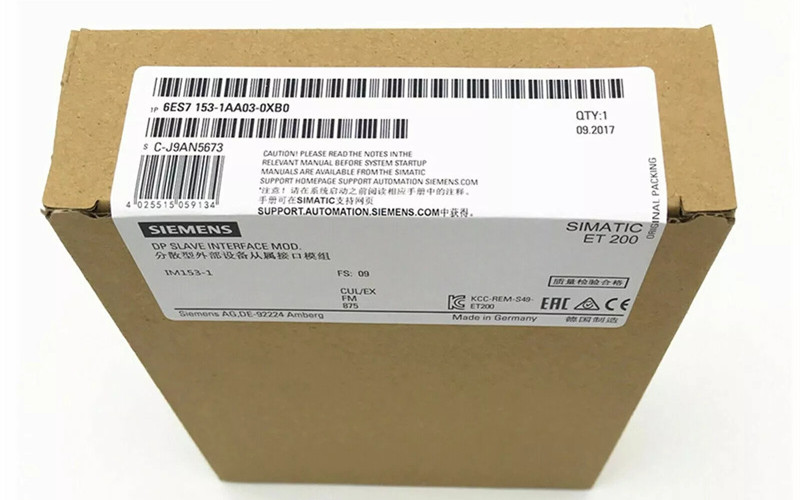
A Guide of Siemens 6ES7153-1AA03-0XB0
Overview of Siemens 6ES7153 1AA03 0XB0
The Siemens 6ES7153-1AA03-0XB0 interface module seamlessly integrates ET 200M I/O stations with industrial automation systems via PROFIBUS DP, ensuring reliable connectivity and control.
Here's how it's used:
Connect the ET 200M directly to the interface module.
Link the PLC using a PROFIBUS cable to connect with the S7-300.
Configuration: Set module addresses and communication parameters in STEP 7.
Programming: Develop PLC control logic to manage I/O device interactions.
Deploy: Download your program and monitor system performance.
Importance of Interface Modules in Automation
1. Product Positioning & System Architecture
As a key part of the S7-300 PLC series, this interface module acts as a vital link in industrial automation.
l Enables rack-to-rack communication between central controllers and expansion units
Supports distributed expansion with up to 1,024 I/O points per layer
Form cost-effective distributed architectures with ET200M for optimized spare parts management
2. Networking Advantages
Designed for multi-PLC networking and remote I/O applications, the module delivers:
30% reduction in signal latency (validated in industrial tests)
Built-in ground capacitance suppression for long cable runs (up to 100m)
Stable inverter output (IEC 61800-3 compliant)
Simplified wiring with centralized connection points
3. Engineering Benefits
The S7-300's modular design enables:
Flexible centralised/decentralised control configurations
Scalable I/O capacity without hardware modifications
Tool-free maintenance with a hot-swappable component
Siemens Product Lifecycle
Stages of the Siemens Product Lifecycle
Siemens' product lifecycle is generally divided into the following stages:
ü Concept and Planning
Initial feasibility studies, idea generation, and market research.
ü Design and Development
Engineering simulations, detailed design, prototyping and engineering.
ü Manufacturing
Production setup, assembly and quality control.
ü Service and Maintenance
Product deployment, Customer Support, and Ongoing Maintenance
ü End-of-Life
Recycling and disposal of products are also part of the product retirement process.
Siemens also categorizes its products by lifecycle phases to facilitate planning.
ü Active
New projects are highly recommended and supported.
ü Limited/Phase-Out
Reduced production and limited support
ü Discontinued
No longer sold or manufactured, with minimal support.
Transitioning Through Product Lifecycles
Siemens' product lifecycle is typically divided into several stages with distinct tasks and goals.
In Release for sale
The product has been officially launched and is now available for purchase.
Release for delivery
After production, the product is ready for delivery to customers.
Product Obsolescence Announcement
We are replacing and phasing out this product and have begun to slow down production.
l Product Cancellation
We have officially discontinued this product, but some remaining stock is still available for purchase.
l Product Discontinuation
The company has completely withdrawn this product from the market, leaving only existing inventory in stock.
In the third and fourth phases, the new product gradually takes over the old.
Siemens Programmable Logic Controllers
Overview of Siemens PLCs
Siemens PLCs have been widely used for industrial automation to control machinery and processes. Siemens offers multiple PLC series, each engineered to address distinct industrial automation needs:
S7200/S7200 SMART: Compact, cost-effective and entry-level. Ideal for simple tasks such as motor control.
S7300: A mid-range, versatile and modular control system with support for PROFIBUS.
S7400 High-end, robust and reliable. Designed for large-scale industrial applications.
l S7-1200: Small, compact, easy-to-use, and supports modern protocols like PROFINET. Suitable for small and medium projects.
S7-1500: High-performance and scalable, with a wide range of communication options.
The key features include high reliability, flexibility (utilizing ladder logic and function block diagrams), scalability, and advanced communication capabilities (PROFINET, ProFiBUS). Manufacturing plants, process facilities, smart buildings, and renewable energy systems all utilize Siemens PLCs for automation control.
Role of the 6ES7153 1AA03 0XB0 in PLC Systems
The Siemens 6ES7153-1AA03-0XB0 interface module is for the S7300 PLC. It connects to the central controller and ET 200M distributed I/O station, enabling communication in industrial applications. Features include:
Interface PROFIBUS-DP: Supports communications up to 12 Mbit/s.
Power supply: Operates at 24V DC, and the maximum current is 350 mA.
Compatibility: Compatible with S7300 modules and supports direct data transfer.
Environment: Compatible with temperatures between 0degC to 60degC.
This module is crucial for expanding and disseminating control systems. It also enhances the flexibility and scalability of automation setups.
Siemens PLC Programming
1. Hardware Overview
l CPU Modules: Core of the PLC, e.g. S7-1200 and S7-1500.
I/O modules: Connect sensors, actuators and other devices.
Communication modules: for networking (e.g. PROFINET).
2. Programming software
TIA Portal: The Main software used for Configuration and programming.
3. Programming languages
Ladder Logic: The most common, using rungs and contacts.
Function block diagram (FBD).Uses graphic blocks.
Structured text (ST) is text-based like C or Pascal.
4. Basic Steps
Create Project: Open the TIA Portal and install the hardware.
Write Logic Using LD, FBD, or ST to create control logic.
Download to transfer the program from the PLC.
Monitor: Test the program and debug it to identify and resolve any issues that arise.
5. Simple Example
Ladder Logic: Turn an output on when an input is active.
l Plaintext
l Fu Zhi
l |----[I0.0]----(Q0.0)----|
Function block: Control an output using a timer.
l Plaintext
l Fu Zhi
l |----[TON]----(Q0.1)----|
6. Best Practices
Modular design: Use function blocks to reuse.
Documentation: Comment your code
Testing: Verify each component before deployment to ensure it functions properly.
Programming the 6ES7153 1AA03 0XB0
The 6ES7153-1AA03-0XB0 interface module connects ET 200M I/O stations to a SIMATIC S7-300 PLC via PROFIBUS. This is a brief overview of how you can program and configure the module:
The Key Steps:
ü Hardware Installation
ü Connect the 6ES7153 I/O to the ET200M station.
Ensure the PROFIBUS cable is correctly connected to both the PLC module.
ü Configuration using STEP 7
Open STEP 8 to create a new project.
Add the 6ES7153 module to your hardware configuration.
ü Set the ProFIBUS address of the module (typically 1-126).
ü Programming:
You can write your PLC program in ladder logic (LD), function block diagram (FBD) or structured text.
Assure that the program contains logic to read and write inputs to the ET200M modules connected to 6ES7153.
ü Download and test it:
ü Download the PLC program.
STEP 7: Monitor the I/O status to confirm communication and functionality.
Technical Specifications
ü Supply Voltage: 24V DC
ü Current consumption: up to 350 mA.
ü Operating temperature: 0 °C - 60 °C.
ü Communications: Supports PROFIBUS-DP up to 12 Mbit/s.
The Siemens 6ES7153-1AA03-0XB0 is a spare part designed explicitly for the ET200M distributed I/O system, supporting the connection of up to eight S7-300 modules.
The module features a PROFIBUS DP interface with a transmission speed of 12 Mbit/s, operates at 24V DC (with a maximum current consumption of 350mA), and is designed for industrial environments with an operating temperature range of 0°C to 60°C.
Siemens Automation Solutions
Integrating the 6ES7153 1AA03 0XB0 in Industrial Automation
The Siemens 6ES7153-1AA03-0XB0 interface module connects ET 200M I/O stations to industrial automation systems via PROFIBUS DP.
ü How to use? First, attach it directly to an ET 200M I/O station. Then, connect it to an S7-300 PLC using PROFIBUS cables.
ü Configure: Use STEP 7 to define the address and communication parameters for the module. Program: Develop control logic within your PLC to interact with I/O devices. Deploy: Download your program and monitor system performance.
This module enables distributed control, providing increased flexibility and scalability in automation setups.
Benefits of Using Siemens Automation Solutions
High-reliability Siemens products are designed to operate reliably in demanding industrial environments. This minimizes downtime.
ü Scalability: Solutions can be easily scaled up from small systems to large ones, adapting to changing business requirements.
ü Siemens seamlessly integrates a comprehensive portfolio of hardware, software and services to deliver complete automation solutions.
Advanced Communications: Supports protocols such as PROFINET and PROFIBUS to ensure seamless integration with other devices.
ü User-friendly: TIA Portal and other tools simplify programming and Configuration, even for complex systems.
Energy Efficient: Siemens offers numerous solutions that optimize energy usage and reduce operational costs.
ü Support Global Siemens offers extensive technical support and worldwide training.
Importance of Interface Modules in Automation
1. Product Positioning & System Architecture
As a core component of the S7-300 PLC series, this interface module serves as a critical bridge in industrial automation:
Enables rack-to-rack communication between central controllers and expansion units
Supports distributed expansion with up to 1,024 I/O points per layer
Form cost-effective distributed architectures with ET200M for optimized spare parts management
2. Networking Advantages
Designed for multi-PLC networking and remote I/O applications, the module delivers:
30% reduction in signal latency (validated in industrial tests)
Built-in ground capacitance suppression for long cable runs (up to 100m)
Stable inverter output (IEC 61800-3 compliant)
Simplified wiring with centralized connection points
3. Engineering Benefits
The S7-300's modular design enables:
Flexible centralised/decentralised control configurations
Scalable I/O capacity without hardware modifications
Tool-free maintenance with hot-swappable components
Siemens Product Lifecycle
Stages of the Siemens Product Lifecycle
Siemens' product lifecycle is generally divided into the following stages:
Concept and Planning
Initial feasibility studies, idea generation, and market research.
Design and Development
Engineering simulations, detailed design, prototyping and engineering.
l Manufacturing
Production setup, assembly and quality control.
Service and Maintenance
Product deployment, Customer Support, and Ongoing Maintenance
l End-of-Life
Recycling and disposal of products are also part of the product retirement process.
Siemens also categorizes its products by lifecycle phases to facilitate planning.
l Active
New projects are highly recommended and supported.
Limited/Phase-Out
Reduced production and limited support
l Discontinued
No longer sold or manufactured, with minimal support.
Transitioning Through Product Lifecycles
Siemens' product lifecycle is typically divided into several stages with distinct tasks and goals.
ü Release for sale
The product has been officially launched and is now available for purchase.
ü Release for delivery
After production, the product is ready for delivery to customers.
ü Product Obsolescence Announcement
The product is replaced and phased out. Production starts to slow down.
ü Product Cancellation
The product has been officially discontinued, but existing stock may still be available.
ü Product Discontinuation
The product has been completely withdrawn from the market, and the only remaining stock is the existing inventory that is currently available.
In the third and fourth phases, the new product gradually takes over the old.
Siemens Programmable Logic Controllers
Overview of Siemens PLCs
Siemens PLCs have been widely used for industrial automation to control machinery and processes. There are several series of Siemens PLCs, each designed to meet different application requirements:
ü S7200/S7200 SMART: Compact, cost-effective and entry-level. Ideal for simple tasks such as motor control.
ü S7300: A mid-range, versatile and modular control system with support for PROFIBUS.
ü S7400 High-end, robust and reliable. Designed for large-scale industrial applications.
ü S7-1200: Small, compact, easy-to-use, and supports modern protocols like PROFINET. Suitable for small and medium projects.
ü S7-1500: High-performance and scalable, with a wide range of communication options.
The key features include high reliability, flexibility (utilizing ladder logic and function block diagrams), scalability, and advanced communication capabilities (PROFINET, ProFiBUS). Siemens PLCs can be found in many industries, including Manufacturing, process automation and building management. They are also used for renewable energy.
Role of the 6ES7153 1AA03 0XB0 in PLC Systems
The Siemens 6ES7153-1AA03-0XB0 interface module is for the S7300 PLC. It connects to the central controller and ET 200M distributed I/O station, enabling communication in industrial applications. Features include:
ü Interface PROFIBUS-DP: Supports communications up to 12 Mbit/s.
ü Power supply: Operates at 24V DC, and the maximum current is 350 mA.
ü Compatibility: Compatible with S7300 modules and supports direct data transfer.
ü Environment: Compatible with temperatures between 0degC to 60degC.
Siemens PLC Programming
Basics of Siemens PLC Programming
1. Hardware Overview
CPU Modules: Core of the PLC, e.g. S7-1200 and S7-1500.
I/O modules: Connect sensors, actuators and other devices.
Communication modules: for networking (e.g. PROFINET).
2. Programming software
TIA Portal: The Main software used for Configuration and programming.
3. Programming languages
Ladder Logic: The most common, using rungs and contacts.
Function block diagram (FBD).Uses graphic blocks.
Structured text (ST) is text-based like C or Pascal.
4. Basic Steps
Create Project: Open the TIA Portal and install the hardware.
Write Logic Using LD, FBD, or ST to create control logic.
Download to transfer the program from the PLC.
Monitor: Test the program and debug it to identify and resolve any issues that arise.
5. Simple Example
Ladder Logic: Turn an output on when an input is active.
Plaintext
Fu Zhi
|----[I0.0]----(Q0.0)----|
Function block: Control an output using a timer.
Plaintext
Fu Zhi
|----[TON]----(Q0.1)----|
6. Best Practices
Modular design: Use function blocks to reuse.
Documentation: Comment your code
Testing: Verify each component before deployment to ensure it functions properly.
Programming the 6ES7153 1AA03 0XB0
The 6ES7153-1AA03-0XB0 interface module is used to connect ET 200M I/O Stations with a SIMATIC S7300 PLC using PROFIBUS. This is a brief overview of how you can program and configure the module:
The Key Steps
Hardware Installation
Connect the 6ES7153 I/O to the ET200M station.
Ensure the PROFIBUS cable is properly connected to both the PLC module.
Configuration using STEP 7
Open STEP 8 to create a new project.
Add the 6ES7153 module to your hardware configuration.
Set the ProFIBUS address of the module (typically 1-126).
Programming:
You can write your PLC program in ladder logic (LD), function block diagram (FBD) or structured text.
Assure that the program contains logic to read and write inputs to the ET200M modules connected to 6ES7153.
Download and test it:
Download the PLC program.
STEP 7: Monitor the I/O status to confirm communication and functionality.
Technical Specifications
Supply Voltage: 24V DC
Current consumption: up to 350 mA.
Operating temperature: 0 °C - 60 °C.
Communications: Supports PROFIBUS-DP up to 12 Mbit/s.
This module is vital for distributed control systems. It enables you to expand the PLC network quickly and efficiently.
Siemens Automation Solutions
Integrating the 6ES7153 1AA03 0XB0 in Industrial Automation
The Siemens 6ES7153-1AA03-0XB0 interface module connects ET 200M I/O stations to industrial automation systems via PROFIBUS DP. Here's how it's used: interieur Connect ET 200M: Attaching it directly to an ET 200M I/O station is required before linking it with an S7-300 PLC using PROFIBUS cables.
Configure: Use STEP 7 to define the address and communication parameters for the module. Program: Develop control logic within your PLC to interact with I/O devices. Deploy: Download your program and monitor system performance.
This module enables distributed control, providing increased flexibility and scalability in automation setups.
Benefits of Using Siemens Automation Solutions
High-reliability Siemens products are designed to operate reliably in demanding industrial environments. This minimizes downtime.
Scalability: Solutions can be easily scaled up from small systems to large ones, adapting to changing business requirements.
Siemens offers a comprehensive range of hardware, software, and services that are seamlessly integrated.
Advanced Communications: Supports protocols such as PROFINET or PROFIBUS to ensure smooth integration with other devices.
User-friendly: TIA Portal and other tools simplify programming and Configuration, even for complex systems.
Energy Efficient: Siemens offers many solutions that optimize energy usage and reduce operational costs.
Support Global Siemens offers extensive technical support and worldwide training.
You may be interested in other part numbers under the same series besides the Siemens 6ES7153-1AA03-0XB0 Interface Module. Please refer to the following or contact us for more information.
6ES7511-1AK00-0AB0 - Siemens S7-1500 CPU 1511-1 PN
6ES7512-1AK00-0AB0 - Siemens S7-1500 CPU 1512-1 PN
6ES7513-1AL00-0AB0 - Siemens S7-1500 CPU 1513-1 PN
6ES7522-1BF00-0AB0 - Siemens S7-1500 Digital Output Module
6ES7521-1BL00-0AB0 - Siemens S7-1500 Digital Input Module
6ES7523-1HL00-0AB0 - Siemens S7-1500 Analog Input Module
6ES7531-7KF00-0AB0 - Siemens S7-1500 Communication Processor
Back to the top: https://www.ymzdcs.com/product/siemens-plc/
