
Previous
Next
Unlocking the Wago 750-881: A Guide to Ethernet Control
1. Introduction
1.1 Overview of Programmable Logic Controllers
Factories began replacing relay systems with Programmable Logic Controller (PLC) in the late 1960s. PLCs provided significant advantages - they were more flexible, reliable, and easier to program than traditional relays.
These controllers can withstand both heat and cold, tolerate electrical noise, and continue to function even in the presence of vibration. This makes them great for factory automation.
Ladder logic is the most common method for programming Programmable Logic Controllers (PLCs). This is because it resembles electrical relay diagrams. Other methods are structured text, sequential function charts, and function block diagrams.
You can integrate Programmable Logic Controllers (PLCs) with Supervisory Control and Data Acquisition (SCADA) systems to facilitate remote monitoring and data recording. We utilize Programmable Logic Controllers (PLCs) extensively in various industries, ranging from small machines to large-scale automation systems.
PLC is a central component of modern industrial control systems. They enhance efficiency, precision, and reliability.
1.2 Importance of Ethernet Control in Automation
Ethernet Control enables high-speed Communication between industrial devices, such as PLCs, sensors, and other devices. The key protocols — EtherCAT, PROFINET, and Ethernet/IP — deliver real-time performance and scalability with minimal latency.
Benefits include:
Integration of IT simplifies data analytics and remote monitoring (essential for Industry 4.0).
Lower costs through minimal wiring and easy maintenance
Interoperability across vendors, protecting long-term investments.
Cloud- and IoT-ready communications provide secure, fast connections.
Ethernet control is ideal for next-generation automation. It balances real-time control with data-intensive applications.
2. Wago 750-881 Features
2.1.Key Specifications
Product Type: Fieldbus Coupler (Modular I/O System)
Series: WAGO 750 Series (PFC200 Series).
Protocols for Communication
PROFIBUS DP
Operating Voltage 24V DC (19.2-28.8V DC)
Power consumption: 1.5 W
Data Transmission Rate: up to 12 Mbps. (Adjustable by baud rate setting).
The number of I/O modules can range from 1 to 64, depending on the configuration.
Max. Maximum Digital I/O points: 2048 bytes (1024 Inputs + 1024 Outputs).
Physical & Environmental Specifications
Housing Material: Polycarbonate (PC)
IP20 protection class
Operating temperature: from -13°F up to +131°F (-25°C).
Temperature of Storage: (-40°F - +185°F).
Relative Humidity: 5-95% (non-condensing)
Dimensions: (W x H and D): approx. 64x100x68mm (varies depending on configuration)
Weight: Approx. Weight: 150 g
Communication and Addressing
PROFIBUS address setting via DIP switch (0 to 99) or software configuration
GSD File is available for integration with PLC systems, such as Siemens STEP 7.
Diagnostics: LED indicator for power (PWR), bus activity, and module Status.
Additional Features
Hot-swappable modules (supports live insertion/removal)
electrically isolated Bus interface
Supports WAGO 750 and 753 I/O modules. (digital, analogue, special functions).
Configurable using WAGO-I/O PRO and PLC engineering tools, e.g., TIA Portal
Standards & Certifications
CE (for hazardous zones, depending on configuration), UL, cULus
Compliant to EN 61131-2 and IEC 61000 (EMC).
2.2.Connectivity Options
1. Fieldbus & Industrial Ethernet Protocols
The WAGO-750-881 supports multiple Ethernet and fieldbus communication protocols, including:
PROFINET IO
EtherNet/IP Compatible with Allen-Bradley & Rockwell Automation
Modbus TCP/IP for SCADA and Industrial Communication
CANopen is a device network for CAN-based devices.
DeviceNet (for Allen Bradley & CIP-based networks)
2. Built-in Ethernet ports
2x Ethernet 10/100 Mbps ports (for redundancy in the network, daisy chaining, or separate LAN connections).
Supports TCP/IP, UDP, HTTP, FTP, SNMP, DHCP, etc.
3. Serial Communication (RS-485/RS-232)
Additions of optional serial communication modules, such as 750-600/750 650, can be made for:
Modbus RTU/ASCII for legacy devices
RS-232 & RS-485 communication
4. Wireless & Remote Connection
Additional WAGO 758xxx wireless modules are required to support both WiFi and cellular (4G/LTE) connectivity.
To do cloud-based monitoring, you need a VPN and a way to access it safely from far away.
5. OPC UA & MQTT support
OPC UA (for standardised Data Exchange in Industry 4.0).
MQTT (for IoT & cloud-based data publishing/subscribing)
6. Web-based Configuration and Diagnostics
A web server is built in for easy configuration using a standard browser.
WAGO PFC Engineering Software for Programming (CODESYS based).
7. USB Interface
USB host port to update firmware, log data, and connect peripherals.
8. Expansion via WAGO I/O Modules
Supports WAGO 750 & 753 series I/O modules for digital/analogue I/O, temperature, motion control, etc.
2.3.Performance Metrics
l Fieldbus & Industrial Ethernet Protocols
The WAGO-750-881 supports a variety of fieldbus and Ethernet communication protocols, including:
PROFINET Io (Real-time industrial Ethernet)
EtherNet/IP for Allen-Bradley & Rockwell Automation compatibility
Modbus (TCP/IP) for SCADA and Industrial Communication
l Built-in Ethernet Ports
Two 10/100 Mbps Ethernet ports for network redundancy or daisy chaining
Supports TCP/IP, UDP, HTTP, FTP, SNMP, DHCP, etc.
l Serial Communication (RS-232/RS-485)
You can add serial communication modules (like 750-600 or 750-665) for:
Modbus RTU/ASCII (for legacy devices)
RS-232 & RS-485 communication
l Wireless & Remote Connectivity
Supports WiFi & Cellular (4G/LTE), via additional WAGO 752-xxx wireless module.
For cloud-based monitoring and management, you need secure remote access and a VPN.
l OPC UA & MQTT Support
OPC-UA (for standard data exchange in Industry 4.0).
MQTT (for IoT & cloud-based data publishing/subscribing)
l Web-Based Configuration & Diagnostics
Configured via a web browser
WAGO PFC Engineering Software for Programming (CODESYS based).
l USB Interface
USB host ports for firmware updates, data recording, and connecting peripherals.
l Expansion via WAGO I/O Modules
Supports WAGO 750 & 753 series I/O modules for digital/analogue I/O, temperature, motion control, etc.
3. Getting Started with the Wago 750-881
3.1 Unpacking and Installation
l Unpacking WAGO 750-881
Check the packaging
Look for visible damage to the packaging.
Document the damage (take pictures) before opening the item.
Open Package
Take out the WAGO module 750-881 by gently opening the box.
Ensure you have all the necessary components.
WAGO 750-881 module I/O
Documentation (manuals, datasheets, certifications)
Mounting Accessories (if Any)
Verify the Module
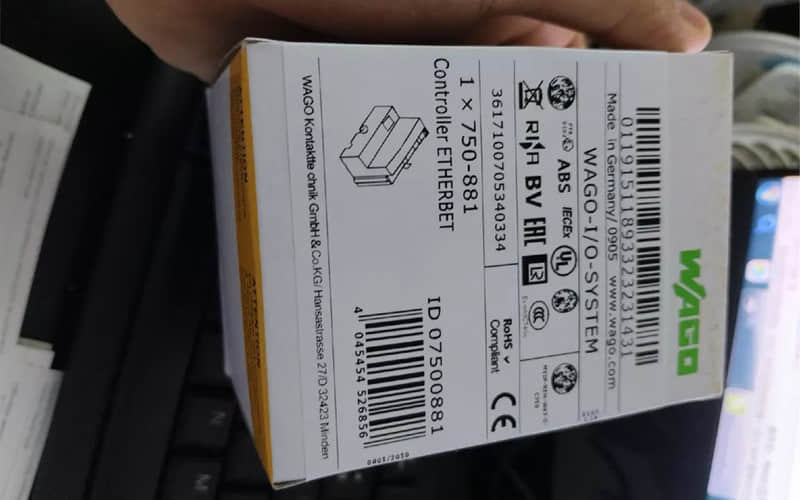
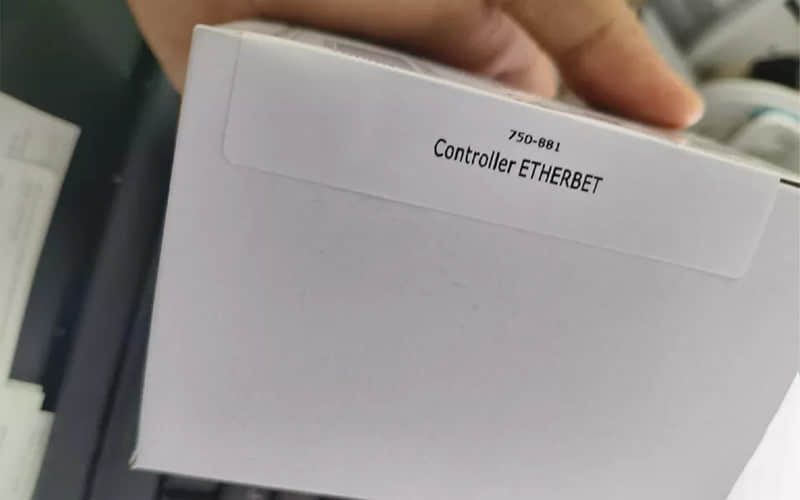
Verify that the model number (750-881) on the label matches the one in the order.
Check for any physical damage, such as cracks or bent pins. ).
l Installation Procedure
Prerequisites:
Before installation, ensure that the power is disconnected.
Take the proper ESD (electrostatic discharge) precautions.
Tools (screwdrivers, DIN rail mounting tools, wiring tools)
Step-by-Step Installation:
Mounting Module
The WAGO 750-881 DIN rail mount is compatible with EN 60715 standards.
Align the module on the DIN rail, and then press until it clicks in place.
Snap the locking mechanism on the bottom to ensure a secure installation.
Wiring connections
Power Source:
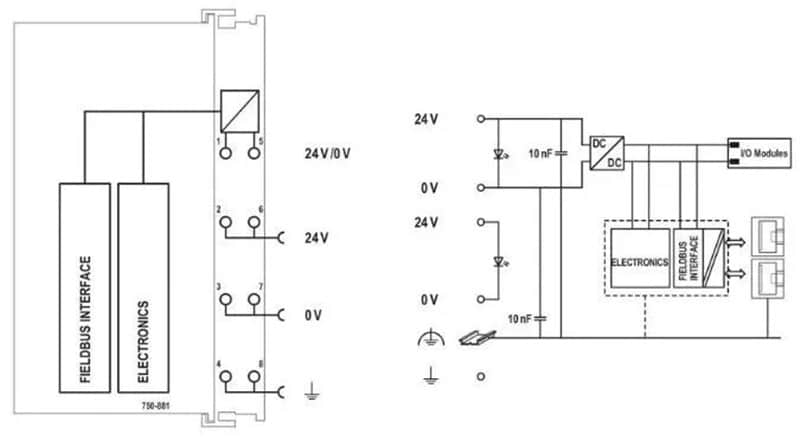
Connect the 24-V DC power supply terminals (positive) and (ground/negative) to the terminals.
To avoid damage, ensure that the polarity is correct.
Field wiring (I/O connections):
Refer to the data sheet for terminal assignment.
Use the appropriate gauge wire (typically between 0.2 and 2.5 mm).
Strip the wires down to 7-8mm and insert them into spring-clamp connectors.
Make sure to clamp the cables securely.
Set up Communication (if applicable)
The 750-881 supports a variety of fieldbus protocols, including PROFIBUS, EtherCAT, and others. ).
Connect the bus cable at the designated communication port.
Stop the bus (if the protocol requires it).
Grounding and Shielding
Connect the shield/ground (if applicable) to the terminal.
To avoid noise interference, make sure the grounding is done right.
Checklist for Final Checks before Power-Up
Verify that all connections are secure.
Check for any loose strands and short circuits.
Check the power and communications wiring.
Test & Power On
Check the status LED of the module (it should indicate regular operation).
You can use configuration software (like WAGO-I/O PRO) to test communication and I/O functions.
3.2 Accessing the Wago 750-881 Manual

3.3 Wago 750-881 Manual PDF Overview
The WAGO manual 750-881 provides detailed technical documentation on the WAGO Programmable Fieldbus controller, a modular I/O system used in industrial automation. This manual includes:
Installation & wiring guidelines
Hardware Specifications (I/O Modules, Power Supply, Communication Interfaces)
Instructions for configuration & programming (using WAGO I/O PRO or CODESYS).
Maintenance & Troubleshooting Tips
Safety precautions and certification
This manual is ideal for engineers and technicians. It ensures that the 750-881 is set up and works correctly in PROFIBUS or Ethernet networks, as well as other fieldbus networks.
3.4 Initial Configuration Steps
Power Up
Connect the controller to the power supply.
Check LED indicators and ensure proper grounding (PWR LED must light up).
Install I/O modules (if applicable).
Snap on additional WAGO I/O Modules (digital/analogue).
Securing all connections is essential.
Connect to PC
Use an Ethernet cable or USB/programming cables (for the 750-881 Ethernet).
If you're using Ethernet, set a static IP address. If you're using a serial port, ensure the COM port is detected correctly.
Install Software
Download CODESYS or WAGO-I/O PRO (for programming).
Install the necessary drivers.
Configure Hardware in Software
Open the PLC Programming Software.
You can detect the 750-881 controller by using the "Scan Devices" feature or manually entering its IP address.
We should load the correct device description file (DDF/GSD), especially for fieldbus models.
Basic I/O Setup
Assign input/output address.
Configure communication (PROFIBUS, Modbus TCP, etc., if applicable).
Download and Test
Write a simple program to test the system (e.g., turn on the digital output).
Download the PLC to monitor I/O status.
Verify and Troubleshoot
Check the LED status (RUN/ERR/COM).
Use software diagnostics to identify errors (e.g., missing modules, communication faults).
4. Applications of the Wago 750-881
4.1 Industrial Automation Scenarios
Factory Automation & Machine Control
Application: Controlling conveyor belts, robot arms, and assembly lines.
Role of 750-881
Sensor inputs are read (proximity sensors, photoelectrics, encoders).
Controls motors, actuators (via VFDs), pneumatic valves, and other devices.
We use sequential logic to automate workflows.
Protocols used: EtherNet/IP (PROFIBUS), Modbus TCP (Modbus TCP).
l Process Automation (Chemical, Water Treatment, Oil & Gas, Oil & Gas, Oil & Gas, Process Automation)
Use it to monitor flow rates, pressures, temperatures, and pH levels.
Role of 750-881
Interfaces with analogue I/O module (4- 20mA and 0- 10V signals).
We use PID loops to regulate precisely.
Logs data via SCADA integration (e.g., Ignition, WinCC).
Modbus RTU/TCP and OPC UA are the protocols used.
l Building Automation (HVAC, Lighting, Energy Management).
Application: intelligent building control for energy savings.
Role of 750-881
We read temperature, humidity, and occupancy sensors..
Controls HVAC dampers and VFD-driven fan motors.
Schedule and manage alarms.
Protocols used: BACnet/IP (via gateways), KNX, MQTT
l Packaging & Material Handling
Applications: Sorting and packaging systems, automated packaging lines.
Role of 750-881
Synchronises the servomotors for precise positioning.
Interfaces for barcode scanners and weigh scales.
It triggers the rejection mechanisms for poor products.
Protocols used: EtherCAT and CANopen
l Renewable Energy Monitoring (Solar/Wind Farm Monitoring).
Application: Remote monitoring for inverters and battery storage.
Role of 750-881
We collect data from voltage sensors and current transformers.
Implement load-shedding logic at peak demand.
Send alerts via SMS or email using IoT gateways.
Modbus TCP (Modbus Transmission Control Protocol), MQTT, and DNP3 are the protocols used.
l Food & Beverage Manufacturing
Applications: Filling machines, batch processing, CIP systems (clean-in-place).
Role of 750-881
Monitors, flow meters, and temperature probes.
Controls solenoid pumps, steam injectors, and valves.
Data logging helps manufacturing meet FDA and GMP requirements.
Protocols used: PROFINET and IO-Link
4.2Case Studies
Case Study: WAGO Conveyor System 750-881
l Client:
A factory upgraded to WAGO 750-881 PLCs. Their conveyors now run 30% faster with perfect accuracy.
l Challenge:
Bottlenecks are caused by slow manual sorting.
People often misplace packages.
No real-time monitoring is available of conveyor status.
l Solution:
The factory installed a WAGO 750-881 programmable logic controller to automate its conveyor system.
l Steps to Implementation:
Sensors & Inputs
Install photoelectric sensors for package detection.
We can add barcode scanners to identify the product type.
WAGO 750-881 Installation
Use digital I/O modules for reading sensors.
Motor drives connect to the conveyor speed control.
Configure Ethernet/IP to monitor in real time.
Logic & Control
Programming in CODESYS to:
Sensors use input to start and stop conveyors.
Sort your packages using diverters into the correct lanes.
If jams occur, trigger alarms.
HMI Integration
A touchscreen panel has been added to allow operators to monitor the status.
Related Part Numbers:
- 750-600: Power Supply Module
- 750-430: Digital Input Module
- 750-530: Digital Output Module
- 750-460: Analog Input Module
Previous: WAGO 750-833 Programmable PROFIBUS Controller PLC Module
