
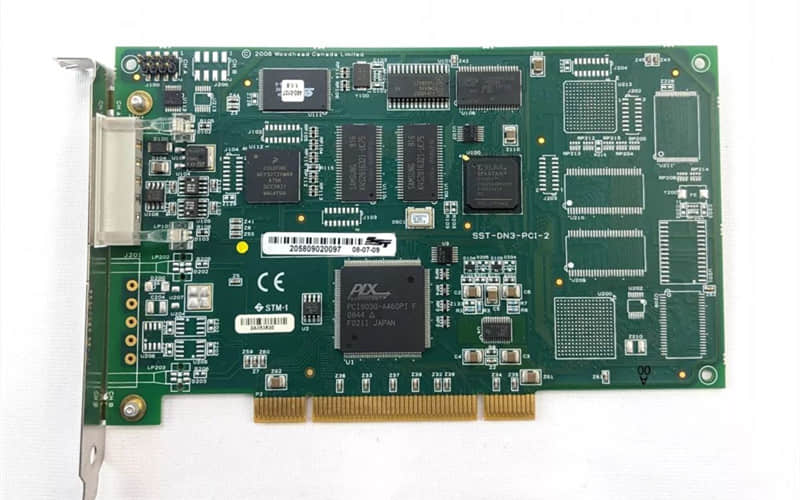
Woodward SST DN3-PCI-2 Interface Card (Ref: 9907-164)
Availability: In Stock | Condition: 100% Original Brand New | Warranty: 1 Year
1. General Description
The Woodward SST DN3-PCI-2 Interface Card (commonly associated with part number 9907-164) is a high-performance communication interface engineered to facilitate seamless, real-time data exchange between SST (Supervisory System Technology) devices and industrial computers. As a critical component for power generation, marine, and complex process control applications, this Woodward communication card (Part No. 9907-164) ensures high reliability and robust performance when monitoring and diagnosing SST-4000 and SST-6000 series hardware. Its rugged construction makes it a trusted solution for demanding industrial environments.
2. Technical Specifications of Woodward 9907-164 / DN3-PCI-2
Part Number / Model: 9907-164 (SST DN3-PCI-2)
Interface Type: PCI (Peripheral Component Interconnect)
Compatibility: Designed for SST-4000 and SST-6000 series turbine control systems
Data Transfer Rate: High-speed communication for real-time industrial data exchange
Operating Temperature Range: -40°C to +85°C (-40°F to +185°F)
Power Supply: 5V DC via PCI slot
Form Factor: Standard PCI card form factor
Certifications: Compliant with industrial standards for EMI/EMC and environmental robustness
3. Key Features & Operational Benefits
Direct Part Match: Fully matches specifications for Woodward 9907-164 interface requirements.
Plug-and-Play Integration: Engineered for straightforward installation and quick system setup.
Multi-Device Support: Capable of supporting multiple SST devices simultaneously to optimize system architecture.
Enhanced Data Integrity: Built-in error-checking mechanisms ensure secure, accurate data transmission.
Harsh Environment Resilience: Ruggedized design guarantees reliable, long-term operation under extreme industrial conditions.
4. Typical Industrial Applications
The Woodward 9907-164 interface module is widely deployed across critical infrastructure sectors:
Power Generation Systems: Steam, gas, and hydro turbine control networks.
Marine Propulsion & Control: Shipboard monitoring and automation architectures.
Industrial Process Automation: Heavy manufacturing and supervisory control systems.
Remote Monitoring & Diagnostics: Real-time data acquisition and telemetry.
5. Step-by-Step Installation Guide
Installation should be performed by qualified instrumentation or IT personnel in compliance with standard safety protocols:
Power Down: Completely shut down the industrial PC and disconnect all power sources.
Access Internal Chassis: Remove the side panel of the PC enclosure to expose the available PCI slots.
Insert the Card: Carefully align the Woodward 9907-164 / DN3-PCI-2 card with an open PCI slot and press down firmly until seated.
Secure the Hardware: Fasten the mounting bracket to the PC chassis using a secure screw.
Reassemble: Reattach the PC side panel securely.
Power Initialization: Reconnect power supplies and boot up the system.
Driver Installation: Install the dedicated communication drivers and software provided by Woodward.
Software Configuration: Launch the setup utility to configure parameters and establish reliable communication with connected SST devices.
6. Related Part Numbers & Accessories
Woodward 9907-164 (SST DN3-PCI-2 Interface Card)
SST-4000 Series Devices (Supervisory Control Units)
SST-6000 Series Devices (Advanced Processing Modules)
Woodward SST Configuration & Diagnostic Software
Frequently Asked Questions (FAQ)
Q: Is the Woodward 9907-164 interface card 100% original and brand new?
A: Yes, we supply 100% original, brand-new industrial automation components, backed by full manufacturer traceability and a 1-year warranty.
Q: Do you keep stock for part number 9907-164?
A: Absolutely. We maintain robust inventory for critical legacy and modern automation cards like the Woodward 9907-164 to support fast global shipping.
Request a Quote for Woodward 9907-164
Need urgent stock availability, technical specifications, or competitive pricing for the Woodward 9907-164 (SST DN3-PCI-2)? Contact our professional sales engineering team today for a rapid quotation.
Previous: WOODWARD 9907-164 505 Turbine Control